Wi-Fi 7 Explained: Does Your Home Need It?
Wi-Fi 7 (802.11be) is the newest Wi-Fi standard. It is faster and handles busy networks better, but you only get the benefit when your devices support it too, and a good wired layout matters more than any logo on the router.
By the Visolution team · 6 min read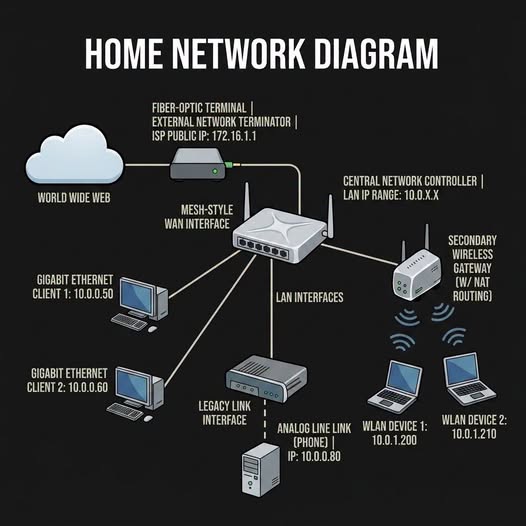
What is new in Wi-Fi 7
- Wider channels: up to 320 MHz in the 6 GHz band, double what Wi-Fi 6E offers, for higher peak speeds.
- Multi-Link Operation (MLO): a device can use more than one band at once, which cuts delay and keeps connections steadier.
- More efficient signalling: 4096-QAM packs more data into each transmission.
The headline speeds on the box are theoretical. Real-world speed depends on your internet plan, the walls in your home and the devices you connect.
Do you need it?
Wi-Fi 7 is worth considering if you have a gigabit or faster internet plan, many connected devices at once, lots of 4K streaming, cloud or console gaming, or you work from home with large video calls and file transfers.
If you have a handful of devices and a modest plan, Wi-Fi 6 or 6E still does the job well. The router is only half of it: your phone, laptop or TV has to support Wi-Fi 7 to use the new features, and many older devices will connect at their own, older speed.
Layout beats the standard
The diagram above shows the usual home layout: a connection from the internet provider, a central router, wired computers and wireless devices. The most effective upgrade is often not a new standard but a better layout. Wire the devices that do not move, such as TVs, desktop computers and game consoles, with Ethernet. That leaves the Wi-Fi free for phones and laptops.
In larger homes a mesh system with wired connections between the units gives more even coverage than a single router, and wired backhaul keeps the speed that Wi-Fi 7 promises.
What a good install includes
- A survey of where signal is weak and where devices actually are.
- Ethernet runs to the TV, office and any other fixed devices.
- Router or mesh units placed for coverage, not hidden in a cabinet.
- A secure setup with your network named and passworded the way you want it.
Common questions
Is Wi-Fi 7 backward compatible?
Yes. Older Wi-Fi 6, 5 and 4 devices still connect, but they run at their own speeds.
Will Wi-Fi 7 make my internet faster?
It will not exceed what your provider delivers. It can make the home network faster and steadier between your devices and the router.
Do I need a new router for Wi-Fi 7?
Yes. A Wi-Fi 7 router or mesh system is required, plus Wi-Fi 7 devices to see the full benefit.